Bass Win Mobile App — Download for Android APK and iOS Devices

The Bass Win mobile app gives you instant access to slots, live casino, sports and esports betting from your phone. Android users download an APK directly from the official site; iOS users add a PWA shortcut to the home screen — no app store needed, no waiting for approval. The full cashier, loyalty program, and all active promotions work inside the app exactly as they do on desktop. A dedicated install bonus of up to £50 rewards your first deposit after setup.

First deposit matched 100% to £200, with 50 free spins credited once you top up
Sign Upwith bonus

Why use the app instead of a browser

The mobile app loads the full product — casino, live dealer tables, sportsbook and cybersport — without relying on a browser tab staying open. The interface is optimised for touch: larger tap targets, faster filter switching in the game lobby, and a persistent bottom navigation bar (Games, Live Casino, Sport, Search). Notifications keep you updated on tournament countdowns and lottery qualification without you having to check the site manually. For players who deposit and withdraw regularly, the cashier opens in one tap from the profile icon rather than navigating through menus.

App features at a glance

Feature Detail
Platform Android (APK) and iOS (PWA)
Download source Official Bass Win site or QR code via basswin07.com
Install bonus Up to £50 depending on deposit amount
Deposit methods in app Visa, Mastercard, Apple Pay, Bank transfer, Crypto
Min deposit (app cashier) £20 via card or Apple Pay; £75 via crypto
Loyalty program Full access — missions, tournaments, VIP tiers
Live sport coverage Football, basketball, tennis, esports and more

How to download the Bass Win app

The app is not listed on Google Play or the Apple App Store. Download links are provided directly on the official Bass Win website under the App section. Android users can also scan a QR code that points to the alternate download mirror. Never use third-party APK repositories — they can distribute modified files. The page on the official site always serves the current signed build, so that is the only source you need.

Installing on Android (APK)

Android blocks installation of files from outside Google Play by default. Follow these steps to install the Bass Win APK safely:

  1. Open the App page on the Bass Win site and tap Download.
  2. Once the APK file has downloaded, tap Open file in the notification shade.
  3. Android will prompt you to allow installation from this source — tap Settings, enable Install unknown apps for your browser, then go back and tap Install.
  4. After installation completes, tap Open to launch the app.

If you see a 'Parse error' or 'App not installed' message, the file did not download completely. Delete it and download again on a stable Wi-Fi connection. If your device security software flags the file, this is a generic warning for any sideloaded APK; the file comes from the operator's own server.

Installing on iOS (PWA)

Apple does not allow sideloaded APKs, so Bass Win uses a Progressive Web App that behaves like a native application:

  1. Open the Bass Win site in Safari (other browsers do not expose the required share menu on iOS).
  2. Tap the Share icon (the square with an arrow at the bottom of the screen).
  3. Scroll down and tap Add to Home Screen.
  4. Confirm the name and tap Add.
  5. The Bass Win icon appears on your home screen — tap it to launch the app in full-screen mode.

The PWA caches resources locally, so the lobby loads quickly even on slower connections. Updates happen automatically when you open the app while online.

Both Android and iOS versions support the full cashier: Visa, Mastercard, Apple Pay, bank transfer, and crypto (BTC, USDT, ETH and more). There is no feature difference between the app and the desktop site.

System requirements and compatibility

Requirement Android iOS
Minimum OS Android 6.0 or later iOS 13 or later
Storage needed ~50 MB for APK Minimal (PWA cache)
Browser for install Any Safari only
Internet Stable 4G or Wi-Fi recommended Stable 4G or Wi-Fi recommended

Most smartphones released after 2018 meet these requirements. Older budget handsets on Android 5 or earlier cannot install the APK.

Registering and logging in via the app

The registration form inside the app collects email, password, and age confirmation (18+). After submitting, you complete your profile with name, date of birth, country, city, and phone number. Social login via Telegram, Google, or X (Twitter) is available as a faster alternative. For a detailed walkthrough of the sign-up process, see the Bass Win registration page. Returning players enter email and password on the login screen, with a Restore link for password recovery.

Payments in the app

The in-app cashier mirrors the desktop experience. Deposit limits per transaction:

Method Min Max
Visa / Mastercard £20 £300
Apple Pay £20 £300
Bank transfer £20 £500
Crypto (BTC, USDT, ETH +10 more) £75 £2,000

Withdrawals via Visa or Mastercard are processed within 24–36 hours. Note that deposits carry a ×3 wagering requirement before withdrawal — this applies regardless of whether you deposit via the app or the desktop site. Uploading KYC documents in advance (passport, proof of address) can speed up your first withdrawal.

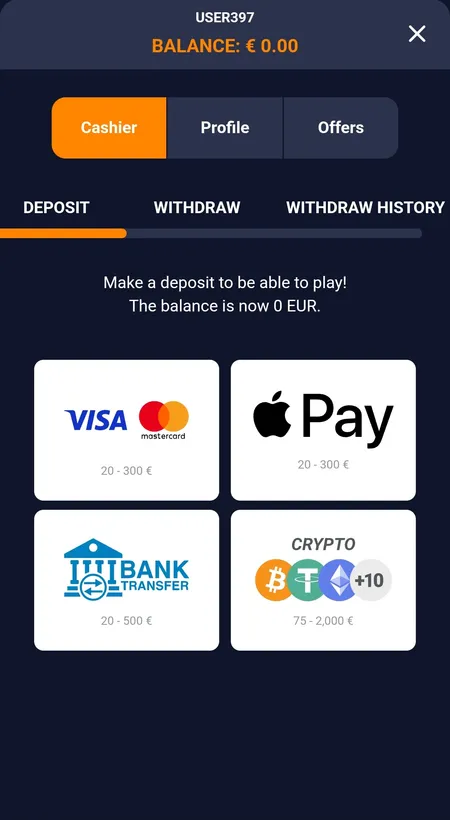
Bass Win app deposit screen with card and crypto options

The in-app cashier shows Visa, Mastercard, Apple Pay, bank transfer and crypto deposit options with GBP limits.

Mobile install bonus

Installing the app and making a qualifying deposit unlocks a tiered cash bonus. The bonus is awarded once per account and requires a deposit of at least £1 either before installation or within 72 hours after.

Deposit amount Bonus
From £1 £5
From £51 £10
From £101 £15
From £251 £20
From £501 £30
From £1,001+ £50

This bonus stacks with other active promotions. During wagering, the maximum bet is £2 (or 20% of the active bonus amount if that figure is lower).

Sports and casino inside the app

The bottom navigation bar gives direct access to the sportsbook and cybersport sections. Live football, basketball, tennis, ice hockey, cricket, and esports (Dota 2, League of Legends, Valorant, CS:GO) are available with real-time odds updates. The casino lobby covers slots, Hold and Win, Crash games, Bonus Buy, table games, virtual sport, and a full live casino with roulette, blackjack, baccarat, and poker tables. Providers include Yggdrasil, PG Soft, BGaming, Spribe and dozens more. For a full breakdown of betting options, visit the Bass Win bet page.

Updating the app

Android: When a new APK version is released, the app may prompt you to update or show a notification on the App page of the site. Simply download the latest APK from the same official source and install it over the existing version — your account data and settings are preserved.

iOS: The PWA updates automatically each time you open it while connected to the internet. No manual action is required.

Security

All data transmitted through the app uses HTTPS encryption. Account access is protected by your password; use the Profile → Password section to change credentials at any time. If you suspect unauthorised access, contact support immediately via the email or UK phone number (+441294620814) listed on the Contacts page. The operator's Terms require identity verification (KYC) before large withdrawals, which adds a layer of protection against fraudulent withdrawal attempts.

FAQ

Where do I download the Bass Win APK?

From the App page on the official Bass Win website. A QR code on that page links to an alternate mirror. Do not use third-party APK sites.

Is the iOS app available on the App Store?

No. iOS uses a PWA installed via Safari: Share → Add to Home Screen → Add. It works in full-screen mode like a native app.

Why does Android warn me about installing the APK?

Android shows this warning for any app installed outside Google Play. Enable 'Install unknown apps' for your browser in Settings, then proceed. The file is served from the operator's own server.

Do I get a bonus for installing the app?

Yes — up to £50, depending on your first deposit amount. The bonus requires a deposit of at least £1 before or within 72 hours of installation, and is awarded once per account.

Can I deposit with crypto in the app?

Yes. BTC, USDT, ETH and at least 10 other cryptocurrencies are available in the cashier, with a minimum of £75 and a maximum of £2,000 per transaction.

How do I update the Android app?

Download the latest APK from the official site and install it over the existing version. Your account and balance are not affected.

What should I do if the APK fails to install?

Delete the file and re-download it on a stable connection. A 'Parse error' usually means the download was incomplete. Check that your device runs Android 6.0 or later.

Are all games available in the app?

Yes — slots, live casino, table games, crash games, sportsbook, and cybersport are all accessible through the app's bottom navigation bar.

Download the Bass Win app and claim your install bonus — up to £50 on your first deposit after setup.